 How to Install
⏳ Loading your dashboard…
Taft School · 2026
One dashboard.
Every assignment.
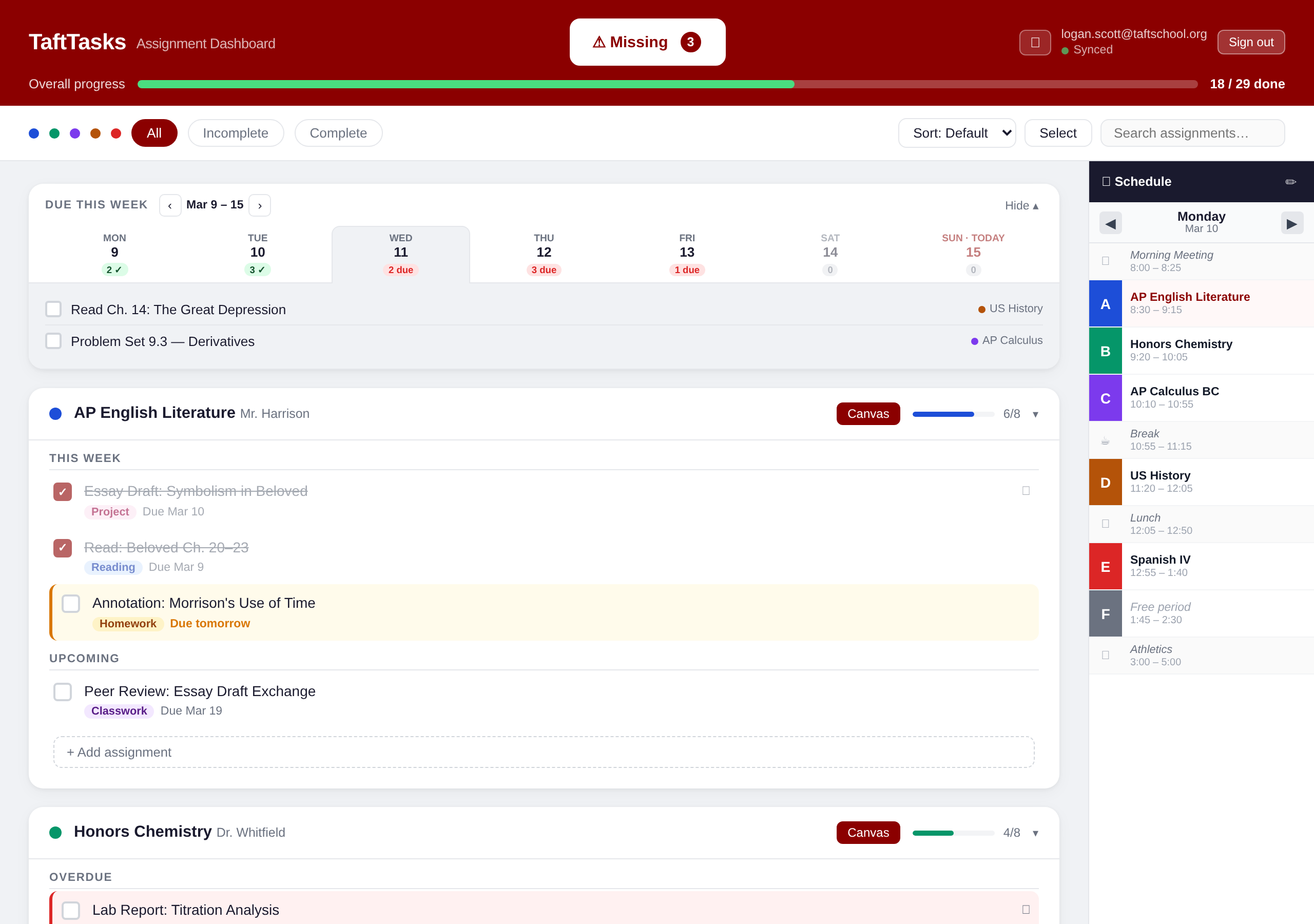
TaftTasks gives you a unified view of all your assignments — pulled from Canvas automatically. Stay on top of what's due, across every course.
Core Features
Everything you need.
Nothing extra.
Auto-Import from Canvas
Use the Chrome extension to scan Canvas and import all your courses and assignments instantly.
Overdue & Missing Alerts
Overdue assignments are flagged automatically. One tap shows everything you still need to hand in.
Cross-Device Sync
Check off work on your laptop — it's done on your phone too. Your progress syncs instantly everywhere.
Setup
Up and running
in two minutes.
1. Sign Up
Create an account with your Taft email address
2. Add Extension
Install the Chrome extension to import courses from Canvas
3. Sync Courses
Click "Find Courses" in the extension to pull in your assignments
4. You're done
Open your dashboard anytime, on any device
Chrome Extension
Import assignments
with one click.
Open any Canvas course page and click the extension to sync all assignments instantly — no copy-pasting required.
Pricing
Try it free.
Keep it simple.
7-day free trial
$1.99 / month
- Full access to all features during your trial
- Auto-import from Canvas via Chrome extension
- Unlimited courses and assignments
- Cross-device sync
- Cancel anytime — no questions asked
Your trial lasts 7 days with full access. After that, you'll need a subscription to keep using TaftTasks. No charge until your trial ends, and you can cancel before then if it's not for you.
FAQ
Common questions from Taft students
The dashboard itself works in any browser. The Chrome extension requires a Chromium-based browser (Chrome, Edge, Arc, Brave) to scrape Canvas. You can use the extension to import once, then access your dashboard from Safari or any other browser.
You get a free trial with full access. After that, it's $1.99/month to keep using TaftTasks. You can cancel anytime, and your data stays safe if you decide to come back.
No. Your dashboard is completely private. Each account is isolated with row-level security — only you can see your courses, assignments, and settings. Teachers and administrators have no access.
TaftTasks does not use or store a Canvas API token. The extension scrapes your assignment pages directly in your browser while you're logged in to Canvas — nothing is sent to our servers except the final assignment data.